Remark

Please be aware that these lecture notes are accessible online in an ‘early access’ format. They are actively being developed, and certain sections will be further enriched to provide a comprehensive understanding of the subject matter.

1.4. Time Series Visualizations#

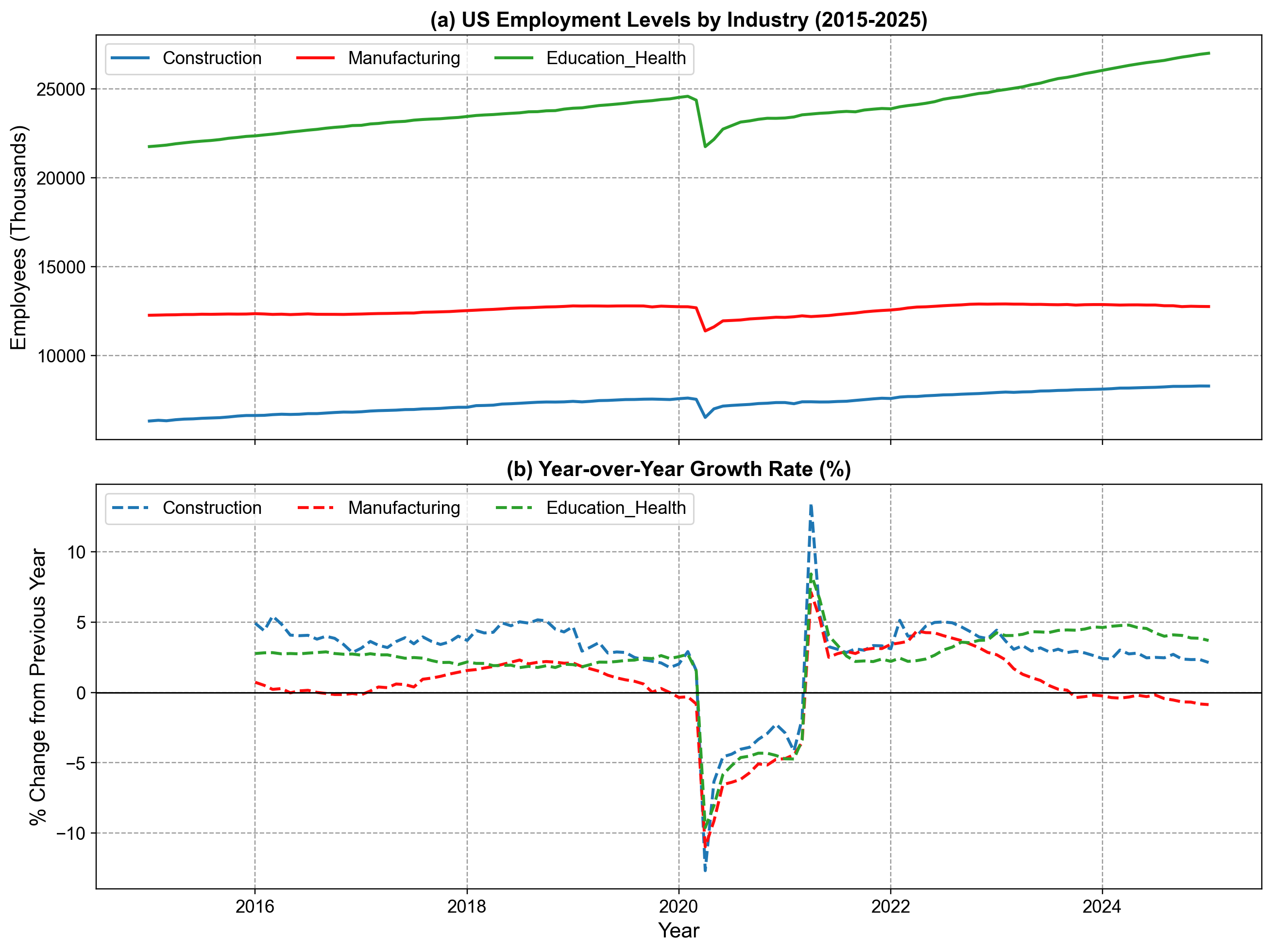
This section demonstrates how to structure and visualize time series data using official sources from the United States and Canada. We will use data from the U.S. Bureau of Labor Statistics (BLS), Environment and Climate Change Canada, and Statistics Canada.

1.4.1. US Employment Data (Bureau of Labor Statistics)#

The Bureau of Labor Statistics (BLS) provides monthly data on employment across various industries. A common way to access this “official” data in Python is using the pandas_datareader library to fetch from FRED (Federal Reserve Economic Data).

1.4.1.1. Fetching and Structuring the Data#

We will look at the “All Employees, Total Nonfarm” series for three major sectors: Construction, Manufacturing, and Education & Health Services.

Hide code cell source

import pandas_datareader.data as web

# Define FRED series IDs for official BLS data
# USCONS: Construction Employees
# MANEMP: Manufacturing Employees
# USPRIV: Total Private Industries (for context)

tickers = {
    'Construction': 'USCONS',
    'Manufacturing': 'MANEMP',
    'Education_Health': 'USEHS'
}

# Fetch data from Jan 2015 to Jan 2025
start_date = '2015-01-01'
end_date = '2025-01-01'

# Pull official data from FRED
employment_df = web.DataReader(
    list(tickers.values()), 'fred', start_date, end_date)

# Rename columns for readability
employment_df.columns = list(tickers.keys())

# Calculate Year-over-Year (YoY) Growth Rates
employment_yoy = employment_df.pct_change(periods=12) * 100
Loading ITables v2.6.2 from the init_notebook_mode cell... (need help?)

1.4.2. Canadian Climate Data (Environment Canada)#

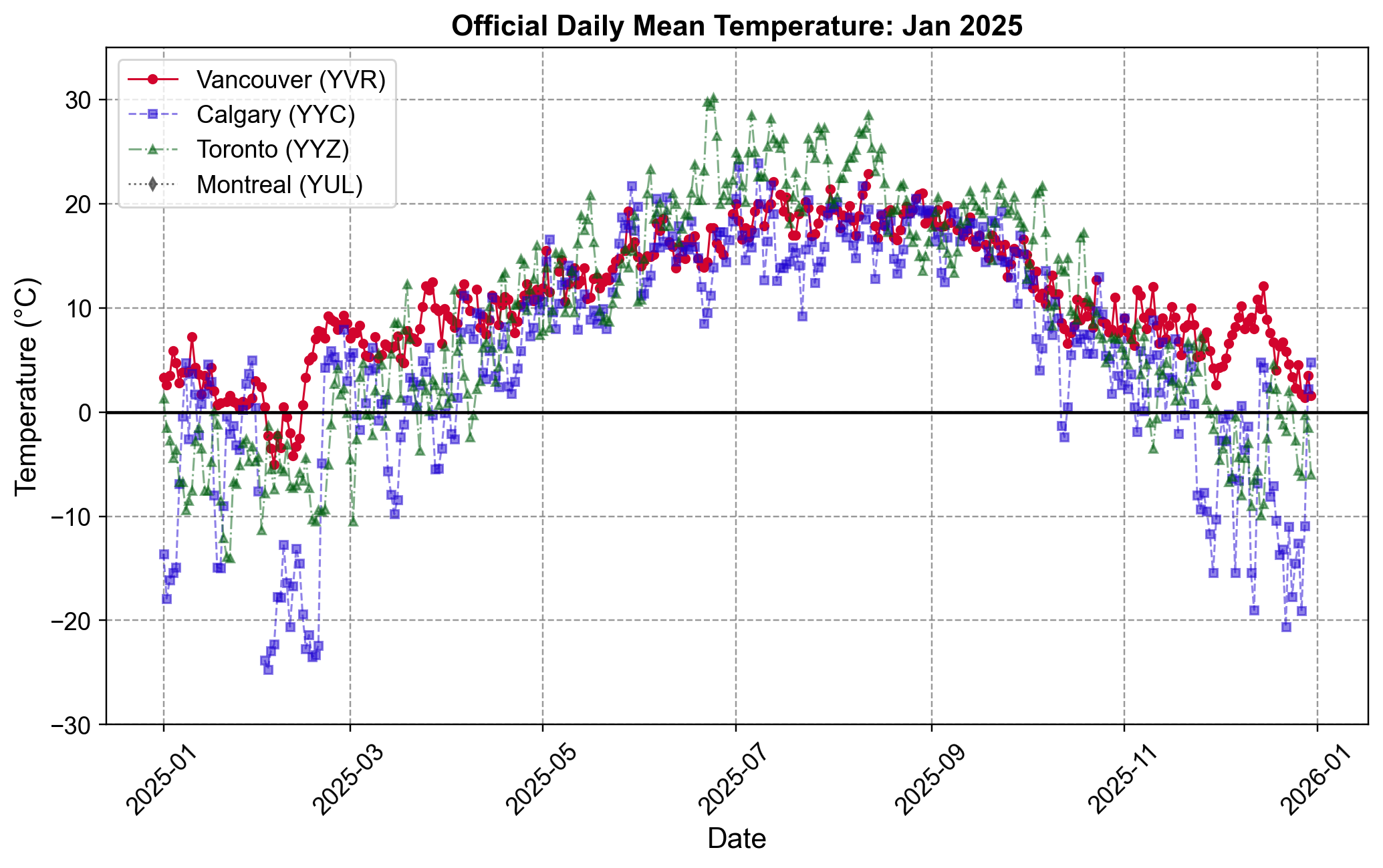
For Canadian weather data, we can pull directly from the Environment and Climate Change Canada Historical Climate Data website using pd.read_csv(). This avoids hardcoding values and allows us to work with official daily records.

The code below fetches daily mean temperatures for January 2025 for four major airports:

  • Vancouver (YVR)

  • Calgary (YYC)

  • Toronto (YYZ)

  • Montreal (YUL)

Hide code cell source

def fetch_weather_data(station_id, year, month):
    url = (
        f"https://climate.weather.gc.ca/climate_data/bulk_data_e.html?"
        f"format=csv&stationID={station_id}&Year={year}&Month={month}&Day=1&timeframe=2"
    )
    return pd.read_csv(url)

# Fetch data for January 2025
# Station IDs: Vancouver (51442), Calgary (50430), Toronto (51459), Montreal (5415)
stations = {
    'Vancouver': 51442,
    'Calgary': 50430,
    'Toronto': 51459,
    'Montreal': 5415
}

dfs = []
for city, station_id in stations.items():
    df = fetch_weather_data(station_id, 2025, 1)
    df = df[['Date/Time', 'Mean Temp (°C)']].rename(columns={'Date/Time': 'Date', 'Mean Temp (°C)': city})
    dfs.append(df)

# Merge all into a single DataFrame
climate_df = dfs[0]
for df in dfs[1:]:
    climate_df = climate_df.merge(df, on='Date')

climate_ts = climate_df.set_index(pd.to_datetime(climate_df['Date'])).drop(columns=['Date'])
Loading ITables v2.6.2 from the init_notebook_mode cell... (need help?)

Hide code cell source

import matplotlib.pyplot as plt

# Define city styles: (city_name, marker, linestyle, color, alpha, label)
styles = [
    ('Vancouver', 'o', '-', '#D2042D', 1.0, 'Vancouver (YVR)'),
    ('Calgary',   's', '--', "#1F04D2",      0.5, 'Calgary (YYC)'),
    ('Toronto',   '^', '-.', "#005F10",      0.5, 'Toronto (YYZ)'),
    ('Montreal',  'd', ':',  "#4D4D4D",      0.8, 'Montreal (YUL)')
]

# Create figure and axes
fig, ax = plt.subplots(figsize=(9.5, 6))

# Plot each city
for city, marker, ls, color, alpha, label in styles:
    ax.plot(
        climate_ts.index,
        climate_ts[city],
        marker=marker,
        markersize=4,
        linestyle=ls,
        color=color,
        alpha=alpha,
        label=label
    )

# Formatting in one call
ax.set(
    title='Official Daily Mean Temperature: Jan 2025',
    xlabel='Date',
    ylabel='Temperature (°C)',
    ylim=(-30, 35)
)

# Freezing line and legend
ax.axhline(0, color='k', linewidth=1.5, linestyle='-')
ax.legend(loc='upper left')

# Rotate x-axis labels
for label in ax.get_xticklabels():
    label.set_rotation(45)

fig.tight_layout()
../_images/daily_mean_temperatures_jan2025.png

Fig. 1.7 Official Daily Mean Temperature for Major Canadian Cities (2025). The plot compares temperature trends for Vancouver (YVR), Calgary (YYC), Toronto (YYZ), and Montreal (YUL) throughout the year. Vancouver (red) exhibits the most stable climate with milder winters, while Calgary (purple) and the eastern cities (green, grey) display sharper seasonal variation and significantly colder winter temperatures dropping below -20°C.#

1.4.3. US Housing Prices (S&P/Case-Shiller)#

Instead of using manual approximations, we can access the official S&P/Case-Shiller Home Price Indices directly from the Federal Reserve Bank of St. Louis (FRED) using the pandas_datareader library.

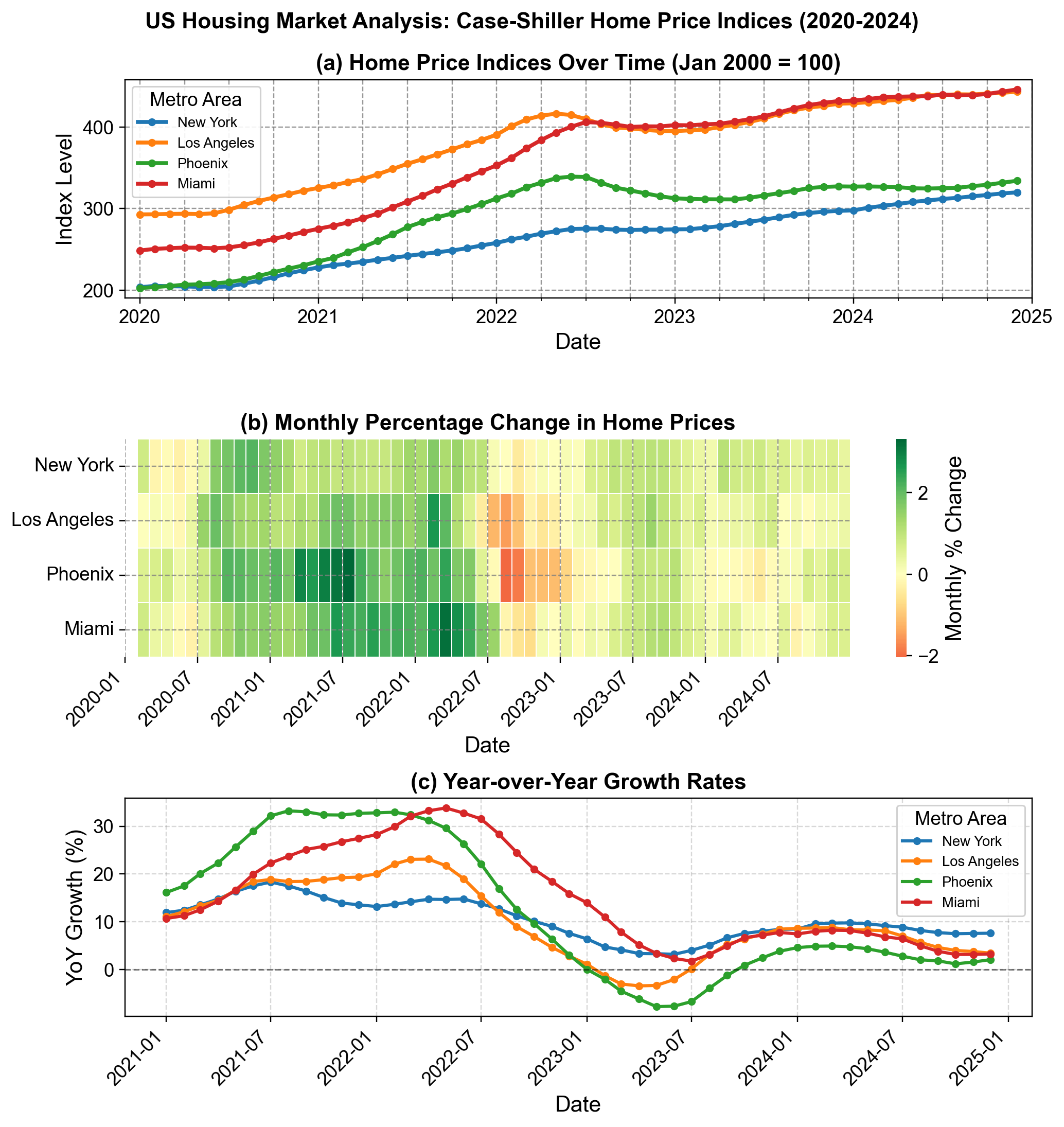
The Case-Shiller Index is the leading measure of U.S. residential real estate prices. We will examine the “Seasonally Adjusted” indices for four major metropolitan areas: New York, Los Angeles, Phoenix, and Miami over an extended period from 2020 to 2024, capturing the post-pandemic housing boom and market shifts.

This example uses monthly frequency data spanning five years. We fetch the official series IDs from FRED and structure them into a single DataFrame with proper datetime indexing, allowing us to identify quarterly patterns and seasonal trends.

Hide code cell source

import pandas as pd
import pandas_datareader.data as web
import numpy as np

# Define FRED Series IDs for S&P/Case-Shiller Indices
# NYXRSA: New York, LXXRSA: Los Angeles, PHXRSA: Phoenix, MIXRSA: Miami
tickers = {
    'New York': 'NYXRSA',
    'Los Angeles': 'LXXRSA',
    'Phoenix': 'PHXRSA',
    'Miami': 'MIXRSA'
}

# Fetch 5 years of data
start_date = '2020-01-01'
end_date = '2024-12-31'
housing_df = web.DataReader(list(tickers.values()),
                            'fred', start_date, end_date)
housing_df.columns = list(tickers.keys())

# 1. Monthly Growth Rates
monthly_growth = housing_df.pct_change() * 100

# 2. Year-over-Year Growth
yoy_growth = housing_df.pct_change(periods=12) * 100

# 3. Quarterly Aggregation (Resample to Quarter End)
quarterly_df = housing_df.resample('QE').mean()
quarterly_growth = quarterly_df.pct_change() * 100
Loading ITables v2.6.2 from the init_notebook_mode cell... (need help?)

1.4.3.1. Plotting Index Growth#

We can visualize the market divergence using subplots: a line chart for the index levels and a heatmap for the monthly growth rates.
Hide code cell source

import matplotlib.pyplot as plt
import seaborn as sns
import matplotlib.dates as mdates
import numpy as np

fig, (ax1, ax2, ax3) = plt.subplots(3, 1, figsize=(9.5, 10))

# --- Panel A: Time Series of Index Levels ---
housing_df.plot(
    ax=ax1,
    linewidth=2.5,
    marker='o',
    markersize=4,
    legend=False
)
ax1.set(
    title='(a) Home Price Indices Over Time (Jan 2000 = 100)',
    ylabel='Index Level',
    xlabel='Date',
    xlim = ['2019-12-01', '2025-01-01']
)
ax1.legend(
    loc='upper left',
    title='Metro Area',
    framealpha=0.9,
    fontsize=9
)

# --- Panel B: Monthly Growth Rates (Heatmap) ---
monthly_growth_display = monthly_growth.copy()
sns.heatmap(
    monthly_growth_display.T,
    cmap='RdYlGn',
    center=0,
    cbar_kws={'label': 'Monthly % Change'},
    ax=ax2,
    linewidths=0.5
)
ax2.set(
    title='(b) Monthly Percentage Change in Home Prices',
    xlabel='Date',
    # ylabel='Metro Area'
)
tick_positions = np.arange(0, len(monthly_growth_display), 6)
ax2.set_xticks(tick_positions)
ax2.set_xticklabels(
    monthly_growth_display.index[tick_positions].strftime('%Y-%m'),
    rotation=45,
    ha='right'
)

# --- Panel C: YoY Growth ---
yoy_growth_subset = yoy_growth.dropna()
for metro in yoy_growth_subset:
    ax3.plot(
        yoy_growth_subset.index,
        yoy_growth_subset[metro],
        marker='o',
        linewidth=2,
        markersize=4,
        label=metro
    )

ax3.set(
    title='(c) Year-over-Year Growth Rates',
    ylabel='YoY Growth (%)',
    xlabel='Date'
)
ax3.axhline(0, color='black', linestyle='--', linewidth=1, alpha=0.5)
ax3.legend(
    loc='best',
    title='Metro Area',
    framealpha=0.9,
    fontsize=9
)
ax3.grid(alpha=0.3)
ax3.xaxis.set_major_locator(mdates.MonthLocator(interval=6))
plt.setp(ax3.get_xticklabels(), rotation=45, ha='right')

# --- Layout ---
fig.suptitle(
    'US Housing Market Analysis: Case-Shiller Home Price Indices (2020-2024)',
    fontsize=14,
    fontweight='bold',
    y=0.99
)
plt.tight_layout()
../_images/housing_market_analysis.png

Fig. 1.8 US Housing Market Analysis: Case-Shiller Home Price Indices (2020-2024). (a) Price indices for New York, Los Angeles, Phoenix, and Miami, showing the divergence in appreciation rates. (b) Heatmap of monthly percentage changes, illustrating the widespread “red” correction phase in late 2022 across all metros. (c) Year-over-Year (YoY) growth rates, capturing the boom-bust cycle where Phoenix and Miami saw growth exceed 30% before cooling significantly in 2023.#